
Address Scanner
LaunchediOS app that scans mailing labels, envelopes, and personal checks to save contact information instantly.
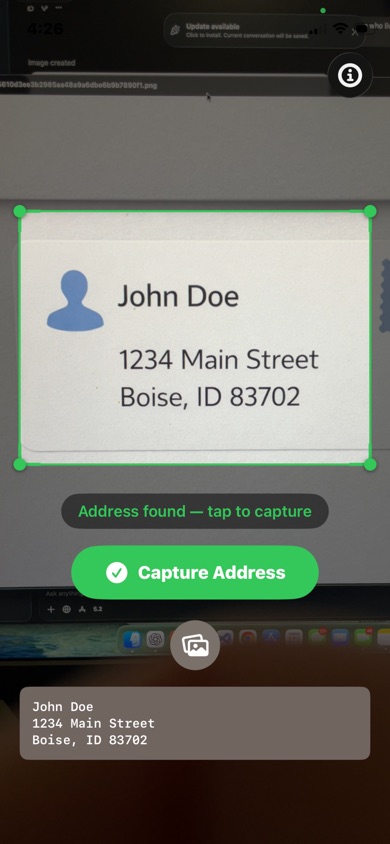
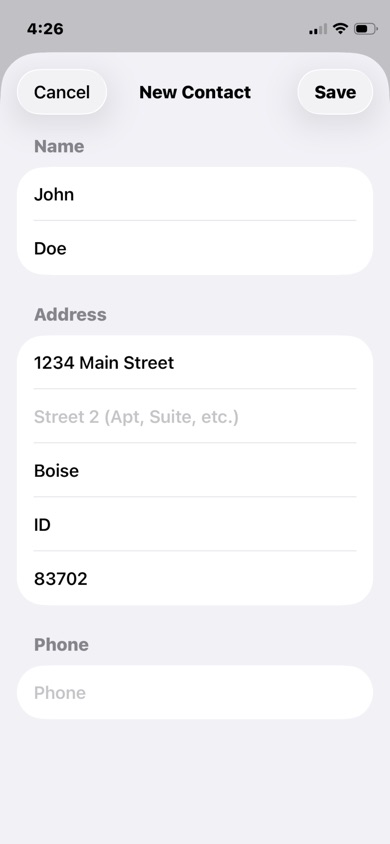
Point your camera at a mailing label, envelope, or personal check and Address Scanner extracts the name, address, and phone number automatically — then saves it directly to your contacts. No typing required.
Free · iOS 16+ · iPhone, iPad, Mac (M1+), Vision Pro


Features
- Live camera scanning — real-time address detection with a green border when a label is ready to capture
- Photo library scanning — import from your camera roll with pinch-to-zoom and rotation to frame the address
- Smart name splitting — detects multiple names on checks (e.g. "John & Jane Smith") and lets you save each individually
- Fuzzy contact matching — finds existing contacts by name with match percentages, and flags duplicates before you save
- Full field editing — review and edit name, street, city, state, ZIP, and phone before saving anything
- Phone number support — extracts phone numbers from personal checks; skips the prompt if the contact already has it
10 free scans per day · Remove limits for $2.99
Press
- Address Scanner on Product Hunt — Product Hunt
Support
Questions or feedback? Email aaron.trank@gmail.com — response within 2 business days.
Frequently Asked Questions
How do I get started? Open Address Scanner and grant camera access when prompted. Point your camera at a mailing label or personal check, and the app will automatically detect the address. Tap "Capture Address" when the green border appears.
What can I scan? Address Scanner works with mailing labels, envelopes, personal checks, and any printed text containing a name and address. It can also extract phone numbers from personal checks.
How do I scan a photo instead of using the camera? Tap the photo icon on the camera screen to select an image from your library. You can pinch to zoom and rotate the image to frame the address, then tap "Scan Address."
How does contact matching work? After scanning, tap the contact icon to find matching contacts. The app searches your existing contacts by name and shows match percentages. It also tells you if a contact already has the scanned address or phone number.
Can I scan a check with two names? Yes. Address Scanner detects names like "John & Jane Smith" or two names on separate lines. It will prompt you to save each person to a contact individually, and you can skip any name you don't need.
Can I edit the scanned information? Yes. The Review Address screen lets you edit every field — name, street, city, state, ZIP code, and phone — before saving to a contact.
What about phone numbers? When a phone number is found (common on personal checks), it appears on the Review screen and you can choose whether to save it to each contact. If the contact already has the same phone number, the app skips the prompt automatically.
Is my data shared or stored online? No. All scanning and text recognition happens entirely on your device. Nothing is uploaded to any server.
Privacy Policy
Address Scanner is committed to protecting your privacy.
Data Collection Address Scanner does not collect, store, or transmit any personal data. All text recognition and address parsing is performed entirely on your device.
Data Sharing We do not share, sell, or transmit your data to any third parties. Your contacts are never uploaded to any server.
Third-Party Services Address Scanner does not integrate with any third-party analytics, advertising, or data collection services. No analytics, tracking, or third-party services are used.
Camera and Photo Access Camera and photo library access are used solely for scanning address labels and checks on your device. Images are processed locally and are never stored or transmitted.
Contacts Access Contacts access is used solely to search for existing contacts and save scanned address information. Your contact data is never uploaded to any server.
Privacy questions? Contact us at aaron.trank@gmail.com.
Terms of Service
This software is provided "as-is" without warranty of any kind, express or implied. In no event shall the developer be liable for any claim, damages, or other liability arising from the use of this software. Use at your own risk.
Address Scanner is developed independently. All rights reserved.